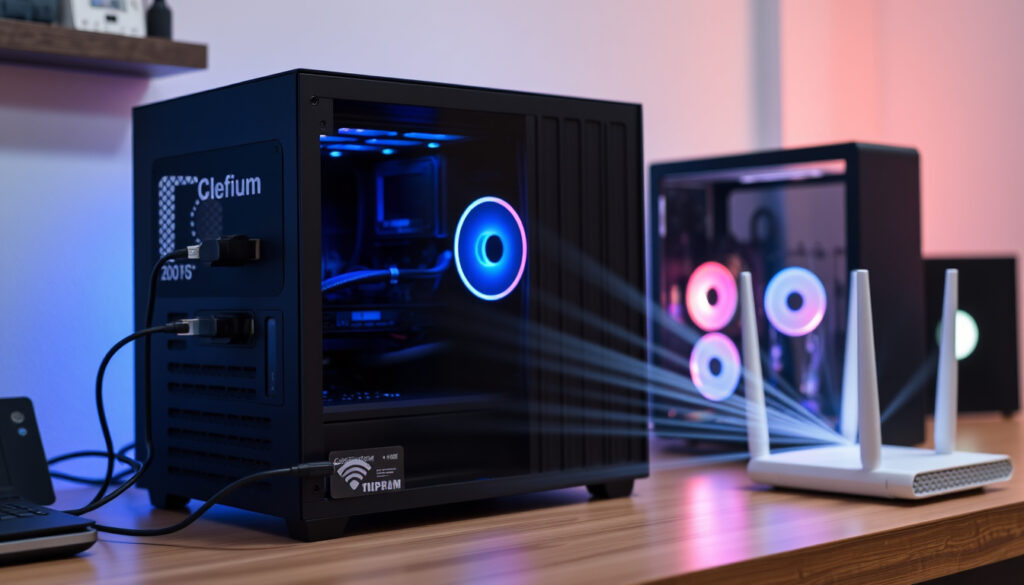
Best WiFi Adapter for PC: USB vs PCIe & Install Guide
Most desktop PCs ship without wireless capability, and that’s by design — wired connections remain the default. But whether you’re dealing with a router tucked in another room or just want the flexibility to reposition your desk, a dedicated WiFi adapter turns that ethernet-only machine into something far more convenient. This guide cuts through the noise to help you pick the right adapter for your Windows PC, whether you’re on a tight budget or chasing every millisecond for competitive gaming.
Common Speeds: 300Mbps to AXE5400 · Interfaces: USB 3.2 Gen 1 · Bands Supported: Tri-band (2.4/5/6GHz) · Windows Compatibility: 10/11 · Guarantee Example: 3 years
Quick snapshot
- USB adapters are plug-and-play on modern Windows (Tom’s Hardware)
- PCIe cards outperform USB for sustained gaming throughput (Best Buy)
- WiFi 7 PCIe adapters like MSI Herald BE hit 2,800+ Mbps in benchmarks (Tom’s Hardware)
- Exact Windows 7 compatibility varies by adapter model
- Real-world latency gaps between WiFi 6 and WiFi 7 under live gaming conditions
- Long-term driver support beyond Windows 11 for newer standards
- WiFi 7 adapters reached consumer availability in 2025
- Best Buy listed Cudy AX3000 at discounted $24.99 in April 2026
- Tom’s Hardware published desktop WiFi card rankings for 2025
- WiFi 7 adoption expected to accelerate as router prices drop
- Bluetooth 5.4 integration becoming standard on PCIe cards
- 6GHz band support likely required for next-gen wireless performance
| Specification | Detail |
|---|---|
| Primary Use | Add WiFi to desktops |
| Top Brands | MSI, TP-Link, Intel |
| Speed Range | 300Mbps – 5400Mbps |
| OS Support | Windows 10/11 |
What does a WiFi adapter do for a PC?
A WiFi adapter bridges the gap between your desktop’s ethernet port and your wireless network. Desktops rarely come with wireless capability built in, so these small add-on devices handle the radio transmission and network handshaking that your PC needs to join WiFi without trailing cables across the room.
How it works
The adapter contains a radio transceiver and antenna system that communicates with your router. When data arrives from the internet, your router broadcasts it wirelessly; the adapter’s antenna catches the signal, and its chipset translates it into ethernet-style data that your motherboard can process. Most modern adapters also support WPA3 encryption and band steering between 2.4GHz and 5GHz frequencies.
Benefits for desktops
Desktops gain wireless flexibility without sacrificing their hardwired ethernet option. Gamers repositioning their setup or anyone dealing with a router in a different room finds adapters simpler than running cables. USB models in particular slide into any machine in seconds — no opening the chassis required.
Which type of WiFi adapter is best for PC?
Two form factors dominate the market: USB dongles and PCIe cards. Each serves a different priority — one prioritizes convenience, the other raw performance.
USB vs PCIe
USB adapters like the NETGEAR Nighthawk A9000 (a Wi-Fi 7 model for Windows 11 PCs) offer portability that PCIe simply cannot match. A PCIe card like the MSI Herald BE — the speed champion at over 2,800 Mbps in Tom’s Hardware benchmarks — requires opening your case and consuming an expansion slot but delivers roughly three times the sustained throughput of comparable USB options. For competitive gamers prioritizing every millisecond, PCIe wins. For users who move between machines or lack available slots, USB is the practical choice.
| Factor | USB Adapter | PCIe Adapter |
|---|---|---|
| Installation | Plug and play, seconds | Requires opening chassis |
| Portability | Transfer between PCs | Fixed to one machine |
| Peak Speed | Up to ~2,000 Mbps | Up to 2,800+ Mbps |
| Price Range | $24–$80 | $25–$130 |
| Bluetooth | Often included | Common on premium models |
WiFi 6E options
WiFi 6E adapters add the 6GHz band to the standard 2.4GHz and 5GHz spectrum. This matters for gaming because the 6GHz band faces less interference from neighboring networks and older devices. Cards like the GIGABYTE GC-WBAX210 (a WiFi 6E PCIe model) specifically target this advantage, while the Intel BE200 chipset powers several top-ranked WiFi 7 options.
WiFi 7 hardware is now available but commands premium pricing — the MSI Herald BE PCIe adapter costs $50, while WiFi 6 alternatives like the Cudy AX3000 drop to $24.99 on sale. Unless your router already supports WiFi 7, the marginal speed benefit may not justify the extra cost today.
Does a PC need a WiFi adapter?
Not every desktop requires one, but certain situations make them essential rather than optional.
When required
If your PC lacks built-in WiFi and you don’t want ethernet cables running across floors or through walls, an adapter is the straightforward solution. Many pre-built desktops omit wireless cards to cut costs, leaving buyers with no wireless option out of the box. USB adapters solve this instantly — just plug and connect.
Alternatives
Ethernet remains the most reliable connection for gaming latency, and some users prefer Powerline adapters or MoCA (coaxial) networking for multi-room coverage. However, these alternatives require compatible infrastructure and often cost more than a mid-range WiFi adapter. For most users without ethernet routing options, a WiFi adapter is the practical path forward.
How to install a WiFi adapter on a computer?
Installation difficulty depends on your chosen form factor. USB models take under a minute; PCIe cards require more patience but reward you with better performance.
USB installation
Insert the adapter into a USB 3.0 port (blue-colored inside your PC or on its rear I/O panel). Modern Windows versions automatically recognize most adapters and begin downloading drivers via Windows Update. If the adapter requires a manual driver install, visit the manufacturer’s support page and download the executable before plugging in the device. Some budget models still ship with CD drivers, but online downloads are faster and more reliable.
- Insert adapter into USB 3.0 port (look for blue plastic inside the port)
- Allow Windows to detect and install drivers automatically
- If prompted, download drivers from the manufacturer’s website
- Connect to your WiFi network via the system tray icon
- Run a speed test to confirm performance
PCIe steps
First, power down your PC and unplug it from the wall — static electricity can destroy components. Open the case side panel and identify an available PCIe x1 or x4 slot (short slots near the CPU). Remove the corresponding expansion slot cover from the rear I/O bracket, insert the card firmly, and secure it with a screw. Close the case, reconnect power, and boot into Windows. Install drivers from the included CD or manufacturer website, then verify the adapter appears in Device Manager.
- Power down and unplug your PC
- Remove the side panel to access internals
- Insert PCIe card into available x1 or x4 slot
- Secure with screw and replace side panel
- Boot Windows and install drivers
- Connect antennae and join your network
Are Wi-Fi adapters worth it?
The value proposition depends heavily on your usage pattern and how much you value mobility versus latency.
Pros and cons
Upsides
- Wireless freedom to reposition your desk anywhere in range
- USB models work on any PC without opening the case
- PCIe options match or exceed USB 3.0 speeds reliably
- WiFi 7 adapters reduce interference on congested networks
Downsides
- Higher latency than wired ethernet (5–15ms typical)
- Signal strength varies with antenna quality and distance
- PCIe installation requires chassis access
- Driver updates may be needed after Windows patches
Gaming use cases
For competitive multiplayer titles like Valorant or League of Legends, that 5–15ms latency gap can affect reaction timing. Professional esports players consistently prefer wired connections for this reason. However, for single-player games, streaming, or casual multiplayer, the practical difference is minimal — most players won’t notice the delta. The real benefit is freedom: a gaming setup no longer needs to live within ethernet-cable reach of your router.
Our overall speed champion is the MSI Herald BE, which is a PCIe Wi-Fi adapter with an optional Bluetooth 5.4 module. It blazed through our iPerf3 tests, surpassing 2,800 Mbps at close range.
— Tom’s Hardware (Technology Review Publication)
The NETGEAR Nighthawk A9000 Wi-Fi 7 Adapter uses a USB-A port and does not include a USB-C-to-USB-A adapter. It’s portable for Windows gaming PCs without PCIe slots.
— Dong Knows Tech (Networking Specialist)
USB adapters built for Windows 11 may not function reliably on Windows 10 and vice versa — always verify driver support before purchasing. Budget models under $30 typically lack the antenna quality needed for reliable 5GHz or 6GHz performance at distance.
GIGABYTE (component manufacturer) positions its WiFi 6E cards for users who need the 6GHz band specifically to avoid congestion from neighbors’ networks. In apartment buildings with dozens of overlapping WiFi networks, this band access genuinely reduces stuttering and lag spikes that plague 2.4GHz and 5GHz connections.
Competitive gamers and streamers who share their setup across multiple machines will see the most value from USB adapters. The pattern holds across price tiers: portability commands a premium, while raw throughput stays reserved for PCIe solutions.
| Adapter | Type | Speed | Price | Best For |
|---|---|---|---|---|
| MSI Herald BE | PCIe WiFi 7 | 2800 Mbps | $50 | Fastest gaming performance |
| NETGEAR Nighthawk A9000 | USB WiFi 7 | ~2000 Mbps | $80 | Portability, no PCIe slot |
| Cudy AX3000 | PCIe WiFi 6 | 3000 Mbps | $24.99 | Budget high-speed option |
| D-Link AC1300 | USB WiFi 5 | 300 Mbps | $24.72 | Basic streaming and browsing |
| GIGABYTE GC-WBAX210 | PCIe WiFi 6E | ~2400 Mbps | $45 | 6GHz band gaming |
| TP-Link Archer TX55E | PCIe WiFi 6 | ~1800 Mbps | $35 | Mid-range value |
The pattern across these adapters shows that PCIe cards consistently deliver higher real-world throughput for the same generation, while USB adapters sacrifice performance for flexibility.
| Specification | USB WiFi 5 | USB WiFi 6 | USB WiFi 7 | PCIe WiFi 6 | PCIe WiFi 7 |
|---|---|---|---|---|---|
| Typical Speed | 300–600 Mbps | 600–1200 Mbps | Up to 2000 Mbps | 1800–3000 Mbps | 2400–5400 Mbps |
| Frequency Bands | 2.4/5GHz | 2.4/5GHz | 2.4/5/6GHz | 2.4/5GHz | 2.4/5/6GHz |
| Windows Support | 7/10/11 | 10/11 | 11 only | 10/11 | 11 only |
| Price Range | $20–$40 | $30–$60 | $70–$130 | $25–$50 | $45–$130 |
| Ideal Use | Basic web browsing | HD streaming | 4K streaming + gaming | Serious gaming | Competitive gaming |
| Installation | External, instant | External, instant | External, instant | Internal, 15 min | Internal, 15 min |
Related reading: Tower Defense Simulator codes · Story of Seasons Grand Bazaar guide
thehitechhub.com, dongknows.com, youtube.com, youtube.com, newegg.com, youtube.com
Desktop enthusiasts comparing USB and PCIe should check best high-speed desktop WiFi adapters for proven high-speed alternatives that boost gaming and stability on stationary rigs.
Frequently asked questions
Will any WiFi adapter work on a PC?
Not all adapters work on every PC. USB models require a compatible port (USB-A or USB-C depending on the adapter) and appropriate driver support for your Windows version. PCIe cards need an available expansion slot and sufficient chassis depth for the card and antennae. Always verify operating system compatibility before purchasing.
How do I know which WiFi adapter to get for my PC?
Start by checking what your PC has available. If you have an open PCIe slot and want maximum performance, choose a PCIe card like the MSI Herald BE or Cudy AX3000. If you prefer not to open your case or need to move the adapter between machines, a USB model like the NETGEAR Nighthawk A9000 fits better. Also confirm your router supports the same WiFi standard — a WiFi 7 adapter connected to a WiFi 5 router won’t unlock faster speeds.
Can a PC run without a WiFi adapter?
Absolutely. The standard alternative is a wired ethernet connection, which offers lower latency and more stable throughput than WiFi. Many gaming desktops include a gigabit ethernet port specifically for this purpose. Powerline or MoCA adapters provide alternatives where running ethernet cables isn’t feasible.
What do I do if my PC doesn’t have a Wi-Fi card?
Add one yourself. For most users, a USB WiFi adapter is the simplest solution — plug it in, install drivers, and you’re connected within minutes. If your motherboard has an available PCIe slot and you want the best possible wireless performance, a PCIe card installation takes longer but pays off in sustained speeds during long gaming sessions.
How do I connect my computer to the internet without Wi-Fi?
The primary alternative is connecting via ethernet cable to your router. If your PC is far from the router, Powerline adapters use your home’s electrical wiring to extend the network, while MoCA adapters leverage coaxial cable lines common in apartments. A WiFi adapter simply adds wireless capability — but if wireless isn’t an option, these wired alternatives often perform better.
What is a WiFi Adapter for PC?
A WiFi adapter is a hardware device that enables a desktop PC to connect to wireless networks. They come in two main forms: USB dongles that plug into external ports, and PCIe cards installed inside the computer. Each translates between the wireless radio signals your router broadcasts and the ethernet-style data your PC’s motherboard processes.
Is there a best WiFi adapter for PC gaming?
The MSI Herald BE holds the current performance crown — a PCIe WiFi 7 card that hit 2,800+ Mbps in Tom’s Hardware benchmarks at close range. For most gamers, the Cudy AX3000 represents a smarter value proposition at $24.99, delivering 3000 Mbps WiFi 6 performance for roughly half the price. The “best” depends on whether you’re chasing benchmark numbers or practical performance per dollar.
More related posts
 iPhone 16e vs iPhone 16: Which Should You Buy
 Both Sides Now Lyrics: Meaning, History, Original Singer
 Floor and Decor Near Me: Stores, Costs & 2026 Trends
 How Much Is Health Insurance in Ireland? 2025 Monthly Costs
 16 Oz to Cups – Exact Liquid Conversions and Dry Tips
 How to Fix Slow MySQL Queries – Complete Optimization Guide
 James Carville’s Democracy Reform Proposals Explained