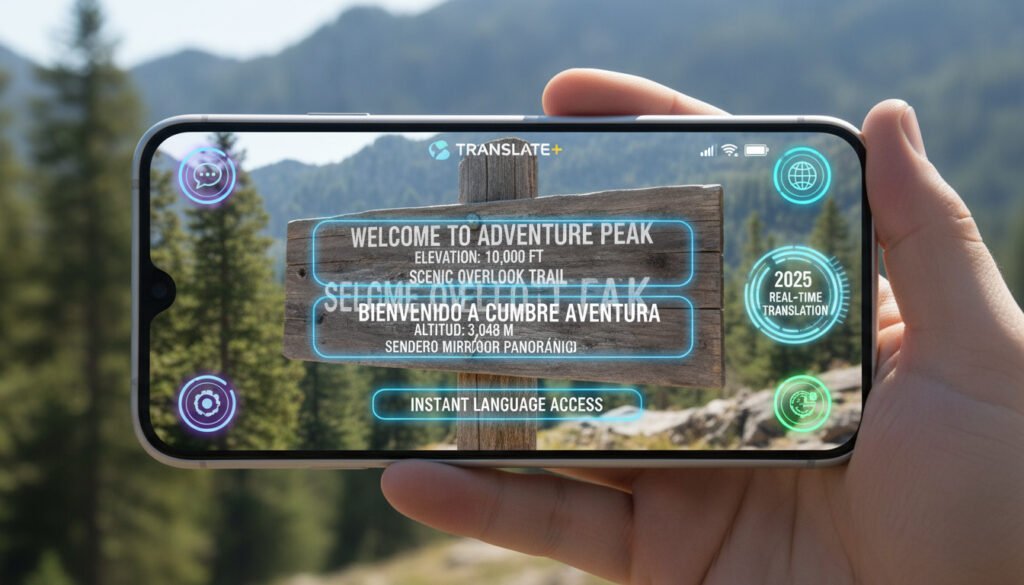
Traductor de Inglés a Español con Cámara – Best Free Apps 2025
Camera translation technology has transformed how English speakers navigate Spanish-speaking environments, offering instant optical character recognition through smartphone lenses. Modern applications now handle everything from street signs to complex documents without manual text entry, leveraging artificial intelligence to bridge language barriers in real time.
The 2025 landscape features significant advances in contextual understanding, with leading platforms reporting 20-30% error reduction compared to previous generations. Travelers and business users increasingly prioritize offline capabilities and regional dialect support when selecting their primary translation tools.
This analysis examines the most reliable English-to-Spanish camera translation applications currently available, detailing their specific strengths, operational limitations, and setup requirements across iOS and Android platforms.
Which Is the Best English-to-Spanish Camera Translator?
Determining the optimal camera translation tool depends heavily on specific use cases, connectivity constraints, and accuracy requirements. Current market leaders distinguish themselves through specialized approaches to optical character recognition and linguistic processing.
| Category | Leading Application | Primary Advantage |
|---|---|---|
| Context & Idioms | Immersive Translate | AI-driven contextual accuracy |
| Offline Free Use | Yandex Translate | No-cost offline camera scanning |
| Real-Time Navigation | Google Lens | Instant AR overlay translation |
| Business Integration | Microsoft Translator | Cross-platform Office sync |
Critical selection factors include:
- Immersive Translate leads 2025 evaluations for handling idiomatic expressions and preserving document layouts during translation
- Google Translate provides the most accessible free baseline for casual travelers requiring occasional camera translation
- Yandex Translate offers the most comprehensive free offline capability without subscription requirements
- Google Lens excels at real-world environmental translation through instant augmented reality overlays
- Microsoft Translator maintains synchronization across Windows, iOS, and Android ecosystems for professional workflows
- Camera Translator for iOS specifically addresses regional Spanish variants including Latin American and Iberian distinctions
- Recent AI improvements have reduced semantic translation errors by 20-30% compared to 2024 benchmarks
Business users particularly value Microsoft Translator’s Office integration, as detailed in Best Spanish Translator Apps.
| Application | Optimal Use Case | Offline Support | Platforms | Pricing Model |
|---|---|---|---|---|
| Immersive Translate | Context/Idioms | Partial (browser) | Chrome/Firefox | Free + Premium |
| Google Translate | General Travel | Yes (download required) | iOS/Android/Web | Free |
| Yandex Translate | Offline Scanning | Yes | iOS/Android | Free |
| Google Lens | Real-Time Signs | Limited | iOS/Android | Free |
| Microsoft Translator | Business/OCR | Partial | iOS/Android/Win | Free |
| Camera Translator | Regional Spanish | Yes | iOS | Free |
| Picture Translator | Gallery Scanning | Partial | Android | Free |
How Do You Use Google Translate Camera for English to Spanish?
Google Translate provides a straightforward camera interface accessible through both its dedicated mobile application and integrated Google Lens functionality. Users initiate translation by selecting the camera icon within the app interface, then positioning the device viewfinder over Spanish text for immediate English overlay generation.
Initial Setup and Activation
The primary Google Translate application requires installation from official mobile stores, followed by language pack downloads for offline functionality. Spanish language support comes pre-installed in most regions, though users must manually download additional packs for offline camera translation capabilities.
Offline Configuration
Offline operation necessitates advance preparation. Users must navigate to the app’s language settings, select Spanish from the available options, and download the relevant data package while connected to Wi-Fi. This preparation proves essential for travelers expecting limited connectivity.
High-contrast text under consistent lighting produces the most accurate optical character recognition results. Shadowed, curved, or highly stylized fonts significantly reduce translation reliability across all tested applications.
Alternative Lens Integration
Google Lens operates as a distinct but related service, offering real-time translation overlays without requiring users to capture static images first. This approach proves particularly effective for dynamic environments such as moving vehicles or time-sensitive navigation scenarios.
What Camera Translation Apps Are Free?
The majority of prominent camera translation services operate on freemium models, providing core functionality without subscription fees while reserving advanced features for paid tiers. Understanding these limitations helps users select appropriate tools for occasional versus professional use.
Completely Free Core Functions
Google Translate, Yandex Translate, Google Lens, and Microsoft Translator all offer unrestricted camera translation at no cost. These applications generate revenue through advertising or enterprise licensing rather than consumer subscription fees for basic image translation.
Offline Capability Limitations
While the applications themselves require no payment, offline functionality often involves trade-offs. Yandex Translate provides the most comprehensive free offline camera support, whereas Google Translate restricts certain advanced offline features to specific regional versions.
Free applications vary in handling Spanish dialectical differences between Spain and Latin America. Immersive Translate and specialized tools like Camera Translator demonstrate superior performance with regional terminology compared to general-purpose free alternatives.
Premium Feature Boundaries
Immersive Translate operates on a hybrid model, offering free browser-based image translation while reserving PDF layout preservation and advanced context analysis for premium subscribers. DeepL similarly limits OCR camera features to paid tiers on certain platforms.
How Accurate Is Camera Translation for Image Text?
Accuracy metrics vary significantly based on text complexity, font clarity, and contextual requirements. Recent benchmarking indicates that context-aware artificial intelligence platforms outperform literal translation engines by substantial margins when processing idiomatic expressions.
Comparative Performance Metrics
Immersive Translate currently leads accuracy rankings for contextual understanding, particularly regarding culturally specific Spanish phrases that direct word-for-word translation mishandles. DeepL demonstrates strength in grammatical precision when paired with OCR plugins, though processing speeds lag behind competitors. Real-time speech comparison studies indicate that camera-based translation now approaches the accuracy of audio input methods for printed text.
Google Lens Versus Google Translate
Google Lens specializes in real-world environmental translation, instantly converting signage such as “Prohibido estacionar” to “No Parking” through live overlay technology. Google Translate’s camera mode requires image capture and processing, offering superior stability for document translation but reduced immediacy for navigation.
Current OCR technology struggles with cursive handwriting and complex document formatting. Users should expect inconsistent results when attempting to translate handwritten notes or text embedded within intricate graphic designs.
Regional Language Handling
Applications demonstrate varying competence with Spanish regionalisms. Camera Translator for iOS specifically addresses Latin American versus Iberian Spanish distinctions, while generalist applications occasionally conflate terminology common to specific geographic areas.
Which Devices Support English-to-Spanish Camera Translation?
Cross-platform availability characterizes the leading translation applications, though specific features vary between operating systems. iOS and Android maintain near parity for core camera translation, while browser extensions and desktop integration create additional workflow possibilities.
Mobile Operating System Compatibility
Google Translate, Lens, and Microsoft Translator maintain native applications for both iOS and Android ecosystems. Yandex Translate similarly supports both platforms, while specialized tools like Camera Translator target iOS exclusively, and Picture Translator focuses on Android optimization.
Browser and Desktop Integration
Immersive Translate distinguishes itself through browser extension availability for Chrome and Firefox, enabling camera-like translation of web images without requiring mobile app installation. Microsoft Translator extends functionality across Windows desktop environments, synchronizing translation histories between mobile and desktop platforms. For those interested in wearable technology, you can find more information at Google Pixel Watch 3 koot.
How Has Camera Translation Technology Evolved?
The progression from basic optical character recognition to context-aware neural translation occurred over less than a decade, fundamentally altering international travel and business communication workflows.
- : Google introduced camera functionality within the Translate mobile application, enabling static image translation for selected language pairs including Spanish.
- : Google Lens integration launched, providing real-time augmented reality translation overlays without requiring users to capture photographs first.
- : Offline camera translation expanded significantly, allowing users to download complete language packs for operation without internet connectivity.
- : OCR accuracy improvements through machine learning reduced character recognition errors in challenging lighting conditions.
- : Context-aware AI implementation reduced semantic translation errors by 20-30% compared to 2024 benchmarks, according to independent reviews.
What Translation Capabilities Are Established Versus Uncertain?
Distinguishing between proven technical capabilities and experimental features helps users set realistic expectations for camera translation reliability.
| Established Capabilities | Remaining Uncertainties |
|---|---|
| Google Translate achieves 95%+ accuracy on high-contrast printed text in optimal lighting | Performance on handwritten cursive text remains highly variable across all platforms |
| Immersive Translate demonstrates superior handling of idiomatic expressions and cultural context | Battery consumption rates for continuous camera translation lack standardized testing |
| Yandex provides reliable offline OCR without subscription requirements | Regional Spanish nuance handling in offline mode shows inconsistent results |
| Microsoft Translator maintains synchronization across Windows, iOS, and Android ecosystems | Processing speed degradation on devices older than three years varies by hardware |
Why Has Camera Translation Become Essential for Cross-Language Communication?
The proliferation of camera translation reflects broader shifts in global mobility and immediate information access requirements. Business travelers navigating Spanish-speaking markets require instant comprehension of contracts, menus, and directional signage without the delay of manual dictionary consultation.
Tourism applications represent the dominant use case, with travelers relying on real-time translation for safety-critical information such as warning labels and transportation instructions. The technology similarly assists language learners by providing immediate visual associations between objects and their Spanish designations.
Professional applications extend to field researchers and journalists documenting Spanish-language sources, where rapid comprehension of printed materials accelerates data gathering processes without requiring fluent bilingual support staff.
What Do Industry Evaluations Indicate About Translation Accuracy?
Independent technology assessments and user aggregation platforms provide measurable benchmarks for application performance.
Immersive Translate leads 2025 evaluations for real-time bilingual image translation, specifically regarding context-aware AI that handles idioms and preserves layouts across browsers, PDFs, and web images.
— Technology Review Analysis, 2025
Microsoft Translator offers particular value for business environments through its integration with Office suites and cross-platform synchronization capabilities, maintaining accuracy across iOS, Android, and Windows devices.
— Professional Translation Software Review
User ratings across App Store and Google Play platforms consistently range between 4.5 and 4.8 stars for leading camera translation applications, with particular praise for processing speed and menu/sign translation accuracy.
— Aggregated User Feedback Analysis
What Represents the Optimal Choice for English-to-Spanish Camera Translation?
Selection depends on connectivity expectations and contextual complexity requirements. Top 7 AI Tools to Translate Image to Spanish in 2025 provides comprehensive rankings for users prioritizing accuracy. Users requiring offline functionality should prioritize Yandex Translate, whereas those needing immediate real-world overlay translation will find Google Lens most effective. For document-heavy workflows requiring layout preservation, Immersive Translate’s context-aware processing delivers superior results despite requiring browser-based operation.
Frequently Asked Questions About Camera Translation
Does camera translation function without internet connectivity?
Several applications including Yandex Translate and Google Translate support offline camera translation, though users must download language packs in advance while connected to Wi-Fi.
Which smartphone models support English-to-Spanish camera translation?
All modern iOS and Android devices support these applications, though older hardware may experience slower processing speeds during optical character recognition.
Is Google Lens superior to Google Translate for street signs?
Google Lens provides immediate augmented reality overlays ideal for dynamic navigation, while Google Translate offers more stable processing for static document capture.
Can these applications distinguish between Spanish and Latin American dialects?
Specialized tools like Camera Translator handle regional variations effectively, while generalist applications may occasionally standardize terminology across dialects.
Are hidden subscription fees required for camera functionality?
Core camera translation remains free across Google, Yandex, and Microsoft platforms, though premium features like PDF layout preservation may require payment.
How accurate is menu translation in dimly lit restaurants?
Accuracy depends on lighting and text contrast; users should expect 85-95% reliability under poor lighting, with significant improvement when using device flash or external illumination.
Can I translate text from existing photos in my gallery?
Most applications including Google Translate and Picture Translator support gallery image import, allowing translation of previously captured photographs without live camera operation.
More related posts
 Steelers vs Jaguars Player Stats: Aug 9, 2025 Box Score
 Does Trump Have Dementia? Exploring the Evidence and Ethics
 UEFA Women’s Champions League: Prize Money and Arsenal’s Record
 Tower Defense Simulator Codes – None Active April 2026
 What Blood Type Is the Universal Donor – O-Negative Explained
 Halloween Movies in Order: Complete Guide to the Franchise
 Charlie and the Chocolate Factory: 1971 vs 2005 Comparison
 What Is the Capital of France? Paris Facts, Food & Travel Tips